
[Rx] How to set the Hugo Favicon
Favicon is the little icon that sits on the left of your browser tab. Normally, this is a piece of cake and it’s just a matter of copying files. Yeah…
Introduction

The Mainroad template that defines the favicon is baseof.html in Mainroad > layouts > _default.
<link rel="shortcut icon" href="{{ "favicon.ico" | relURL }}">
The {{ whatever }} says that this is a Hugo element. My guess is that this finds the “favicon.ico” and inserts the relative URL into the code.
There is also this cryptic comment on the Mainroad FAQ to match favion.ico to highlight color. One of the instructions said:
./themes/mainroad/static/favicon.icoto./static/favicon.ico
So, my guess is that if I put a favicon.ico in ./static/, then Hugo will add that to baseof.html.
1. Create the favicon.ico
Instead of searching my files, I already have the favicon on my active website.
Open the source of any html file (Right click on page. Select View Source.).
Look for the code that looks something like:
<link rel="icon" href="https://developrx.com/wp-content/uploads/2014/11/cropped-DRx_003_md-32x32.png" sizes="32x32" />
My original favicon is a simple .png file:

But, I’m looking for an .ico file for Mainroad. There’s an online image .ico convertor:
The site recommends that you use an .svg file. I plugged in a 192x192 version of the Rx.png and popped out an 16x16 ico.
2. Put favicon in ROOT static folder
Copy the favicon.ico file into root directory static folder.
Just in case, I deleted the cache and other files from the last hour.
Conclusion
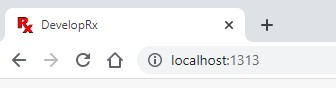
 Mission Accomplished!
So, it was a matter of copying files. The tough part was figuring out what file and where to put it.
