[Rx] Lossless Ripping of Audio from MP4
![[Rx] Lossless Ripping of Audio from MP4](/posts/rx-lossless-ripping-of-audio-from-mp4/_images/ffmpeg-logo.png)
I have some video files in MP4 format. I want rip out the audio (.M4a) without re-encoding.

I have some video files in MP4 format. I want rip out the audio (.M4a) without re-encoding.
![[Rx] How to Trim MP4 Videos](/posts/rx-how-to-trim-mp4-videos/_images/Avidemux_thumb.png)
Ever been sloppy and left a bunch of junk at the beginning of a screen recording figuring to trim it up later? Easy, just grab a free MP4 trimming tool and clean it up, right? Ah… no.
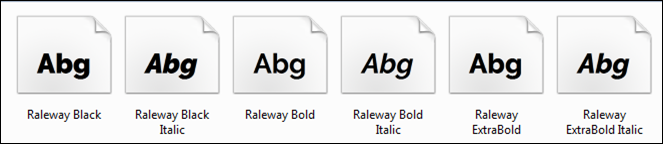
I found the perfect font to use for titles in a presentation, Raleway Semi-bold. I installed it and when I went back to PowerPoint, I had two options: bold and italic. So, where’s semi-bold? A quick search found that it’s a MS-Office problem. A hack around it was to remove all other variations of the bold font, except for the semi-bold. This would be great unless I wanted to use the actual bold font. My solution was to rename the Semi-Bold Raleway font and install it as a “new” font.

Grunt is a command line tool that runs on Node.js and automates your JavaScript build process. Grunt is an “easy” way compile coffeescript, sass, compass. It can minify, concatenate, and a whole lot more. Everything is simple… as long as you know what you’re doing.

![[Rx] Using Wordpress Duplicator to Restore Local Database](/posts/rx-wordpress-duplicator-local-database-restore/_images/wp_02.jpg)
Duplicator is a WordPress plugin to backup, migrate, copy or clone a site from one location to another.
I wrote a recipe up some time ago to do a localhost database restore using Duplicator, but never prettied it up. Since it might be of use to someone in the future (like me), I’m going to go head and publish it.
![[Rx] Customizing Open Live Writer](/posts/rx-customizing-open-live-writer/_images/olw_01.png)
Way back in the day, Microsoft gave out a very good offline blogging program called Windows Live Writer. It was an offline WYSIWYG blog editor that allowed you to write, save, and post all from the comfort of your local PC desktop and came bundled in an online package called Windows Essentials. The program stalled out on version Windows Live Writer 2012.
Microsoft opened sourced the program as Open Live Writer at the end of 2015. From there, it was ignored and forgotten… sad story.
On the off chance you’ve entered a time warp, and go back to 2015, here’s how to customize Open Live Writer.
![[Rx] Trim CSS Fat Using Win7 Grunt](/posts/rx-trim-fat-css-using-grunt-on-ms-windows/_images/2016-01-26_113926.jpg)
Back in the day, you didn’t have to worry about “devices.” Now, we’re all modern. We have stylish CSS that makes HTML look hipster-good on any screen size you can imagine. To do all this you need css code, lots of code.
You can punch the code-masters ticket and roll your own CSS or you can attach everything to a CSS framework ( Bootstrap, Foundation, etc.).
These frameworks don’t know what you want, so they give you EVERYTHING. You have a screen the size of you large toenail? Not a problem, but the typical websites uses less than 80% of all the framework css code.
The price you pay for a kitchen sink framework is speed. Luckily, if you have a need for speed, you can trim out the CSS fat using unCSS.
![[Rx] Install WordPress Theme Unit Data](/posts/rx-install-wordpress-theme-unit-data/_images/wp_02.jpg)
In order to test out a theme, you need some basic content. WordPress already has some content available for testing so don’t have to dream it up yourself (Yay!) called Theme Unit Test.
![[Rx] Creating a WordPress Undescores Starter Theme](/posts/wordpress-undescores-starter-theme/_images/2016-01-21_112522_cr_thumb.jpg)
WordPress Underscores is an online tool for creating a starter theme.
It saves a lot of time because it inserts the name of the theme with an underscore in the variable names in a boilerplate theme. If you activate this theme, it’s just basic text and nothing else.
There’s still more to do to create a WP theme, but it certainly is better than rolling your own.
![[Rx] VM Virtualbox and AVIRA Antivirus Conflict](/posts/rx-vm-virtualbox-and-avira-antivirus-conflict/_images/Merge02_thumb.jpg)
Virtualbox (current version 5.0.10) is free software for creating virtual machines, VMs. These are other computer operating systems and programs running in a self-contained window on your operating system.
Avira 15.0.15 is a free antivirus software that I’ve used for years (now using the built-in Windows Defender).
The long and short of this post is that there is a conflict with these versions causing error messages to pop up.